AI-Powered JSON CRUD Table Maker by Visual Paradigm
Introduction and Key Concepts
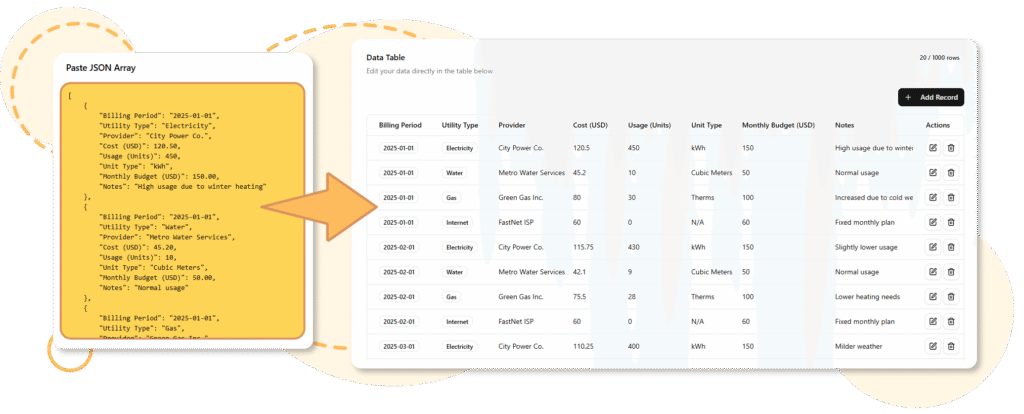
The AI-Powered JSON CRUD Table Maker is a free online tool developed by Visual Paradigm AI that transforms structured JSON data into fully interactive, editable tables. CRUD stands for Create, Read, Update, Delete—the core operations for managing data. This tool bridges the gap between raw JSON (great for machines and data exchange) and spreadsheet-like tables (ideal for human readability and quick editing).
Core Key Concepts
- JSON as Input: JSON (JavaScript Object Notation) is a lightweight format for storing and exchanging structured data, typically as arrays of objects (e.g., a list of products with properties like name, price, and stock).
- AI-Powered Generation: The tool uses AI to analyze your JSON or schema, infer structure (columns, data types), and generate smart, contextually relevant data when needed.
- Interactive Table: The output is a dynamic table where you can view, sort, filter, add rows, edit cells, or delete entries in real-time—no coding required.
- Schema-Based Creation: If you don’t have JSON ready, define a simple schema (column names and types) or even use AI to generate from text descriptions.
- Export Options: Save your edited table back as clean JSON or CSV for integration into apps, reports, or other tools.
- Textual Analysis Integration: The AI can identify domain classes, attributes, and relationships from input, allowing refinement in a visual editor (useful for prototyping data models).
This tool is part of Visual Paradigm’s AI suite, emphasizing speed, intuition, and automation over traditional coding or manual spreadsheet setup.
Benefits of Using the JSON CRUD Table Maker
The tool streamlines data management workflows, making it faster and smarter:
- Productivity Boost: Instantly convert JSON to an editable table, eliminating manual copying into spreadsheets.
- No Coding Required: Ideal for non-developers; prototype databases or mock data effortlessly.
- AI Assistance: Generates realistic data based on patterns (e.g., fills missing values or creates new rows intelligently).
- Flexibility: Start from existing data, a schema, or scratch; supports sorting, filtering, and full CRUD operations.
- Seamless Integration: Export to JSON/CSV for use in applications, APIs, or tools like Excel.
- Faster Than Traditional Methods: Built on Visual Paradigm’s AI modeling framework, it’s more intuitive than writing code or using basic JSON viewers.
- Use Cases:
- Quick data visualization and cleaning.
- Mocking API responses or database prototypes.
- Managing small datasets like inventories, tasks, or logs.
Compared to plain JSON editors or spreadsheets, it combines machine-friendly structure with human-friendly interactivity.
Who Is This Tool For?
- Developers: Rapidly create mock data for testing, prototype database schemas, or debug API outputs without code.
- Data Analysts: Clean, organize, and explore small-to-medium datasets; use AI to infer patterns or generate additional rows.
- Project Managers/Product Owners: Track tasks, team info, or project milestones in a shareable, editable format.
- Anyone Handling Structured Data: From hobbyists organizing personal data to teams reviewing logs or inventories.
It’s especially useful when JSON is the input/output format but you need quick human interaction.
Step-by-Step Tutorial: How to Use the Tool
Access the tool at: https://ai.visual-paradigm.com/tool/json-crud-table-maker/ (or via Visual Paradigm’s app launcher).
Step 1: Access the JSON CRUD Table Maker
- Visit the page linked above.
- Click Try it Now or Get Started Now to launch the tool (it’s web-based and free—no login required for basic use).
Step 2: Choose Your Table Construction Method
You have flexible options to build the table:
Option A: Paste Your JSON Data (Recommended for Existing Data)
- Prepare your JSON (e.g., an array of objects):
text
[ {"name": "Laptop", "price": 999, "stock": 15}, {"name": "Mouse", "price": 25, "stock": 100} ] - Paste it into the JSON input area.
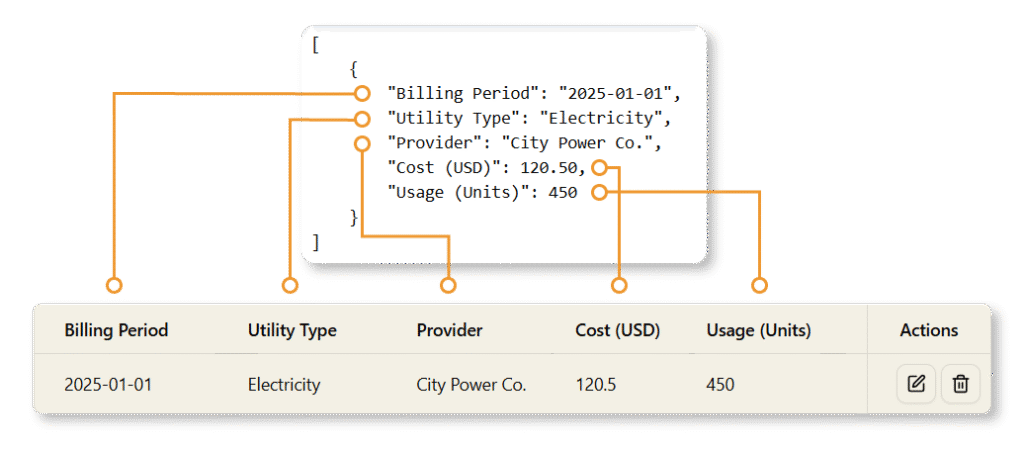
- The AI automatically analyzes the structure and generates an interactive table with columns (name, price, stock) and rows from your data.
- The table appears instantly—responsive and editable.
Option B: Construct via Schema (For Starting from Scratch)
- Switch to the schema mode.
- Define columns manually (e.g., add fields like “Product Name” as string, “Price” as number, “In Stock” as boolean).
- Optionally, use AI features: Provide a text prompt (e.g., “Create a schema for product inventory with name, category, price, and quantity”) for the AI to suggest or generate the schema.
- Once the schema is set, generate an empty table or let AI populate it with sample data.
Option C: AI-Powered from Text (Advanced)
- Use integrated textual analysis: Describe your data needs in natural language, and AI proposes classes/attributes, which you refine before table generation.
Step 3: Edit and Interact with the Table
- Read/View: Sort columns, filter rows, or search.
- Create: Click “Add Row” to insert new entries.
- Update: Double-click cells to edit values inline.
- Delete: Select rows and remove them.
- AI Enhancements: If data is sparse, ask AI to “fill missing values” or “generate 10 more rows based on patterns.”
- Customize: Adjust column order, types, or visibility.
Step 4: Export the Table
- Once satisfied, click Export.
- Choose JSON (preserves structure) or CSV (for spreadsheets/reports).
- Download the file—ready for import into your app, database, or sharing.
Example Workflow: Product Inventory
- Paste sample JSON for products.
- Edit stock levels or add new items.
- Filter low-stock items.
- Export updated JSON for your e-commerce backend.
Advanced Tips
- For complex nested JSON, the tool flattens arrays effectively.
- Combine with Visual Paradigm’s other AI tools for full modeling (e.g., generate ER diagrams from your table).
- Handles common scenarios like API response visualization or quick prototyping.
User Comments and Feedback
As a relatively specialized AI tool within Visual Paradigm’s ecosystem, public user reviews and testimonials specific to the JSON CRUD Table Maker are limited in available sources (no direct comments on the landing page or major review sites as of late 2025). General feedback on Visual Paradigm tools highlights ease of use and intuitive interfaces, with users appreciating the no-code approach for diagramming and data tasks. Broader community discussions on similar AI data tools praise time savings for prototyping and data cleaning, aligning with this tool’s strengths.
If you’re trying it, it’s quick and free—experiment directly to see the benefits firsthand!
This tutorial equips you to fully leverage the AI-Powered JSON CRUD Table Maker for efficient data handling. Get started today at the link above!
Official AI product and overview
- Visual Paradigm homepage (AI-powered modeling focus):
https://www.visual-paradigm.com - AI chatbot for diagramming & modeling:
https://chat.visual-paradigm.com - Visual Paradigm AI diagram generation overview/guide:
https://guides.visual-paradigm.com/visual-paradigm-ai-diagram-generation-guide/
AI chatbot and natural language modeling
- “What Is the Visual Paradigm AI Chatbot?” (concept and usage guide):
https://guides.visual-paradigm.com/introducing-visual-paradigm-ai-chatbot/ - AI chatbot direct entry (create and refine diagrams with prompts):
https://chat.visual-paradigm.com
AI diagram generation tools (online editors)
- AI use case diagram refinement tool (editor):
https://ai.visual-paradigm.com/ai-use-case-diagram-refinement-tool/editor - AI-assisted UML class diagram generator (editor):
https://ai.visual-paradigm.com/ai-assisted-uml-class-diagram-generator/editor
Video tutorials on AI features
- Refine Use Case Diagrams Online with Visual Paradigm’s AI-Powered Tool (YouTube):
https://www.youtube.com/watch?v=rEiveK4PImQ - Create Class Diagrams Automatically Using AI – Visual Paradigm Online Tutorial (YouTube):
https://www.youtube.com/watch?v=h2xDpZix69E
General feature and capability references
- Visual Paradigm – AI-powered visual modeling platform (feature highlights and context):
https://www.visual-paradigm.com - Third‑party overview of Visual Paradigm features (for broader context, not AI-specific):
https://www.topsoftwareadvisor.com/software/visual-paradigm
These links together cover conceptual introductions, official guides, interactive AI tools, and short tutorials that you can use as a study and review set for Visual Paradigm’s AI capabilities.